
AI Quest
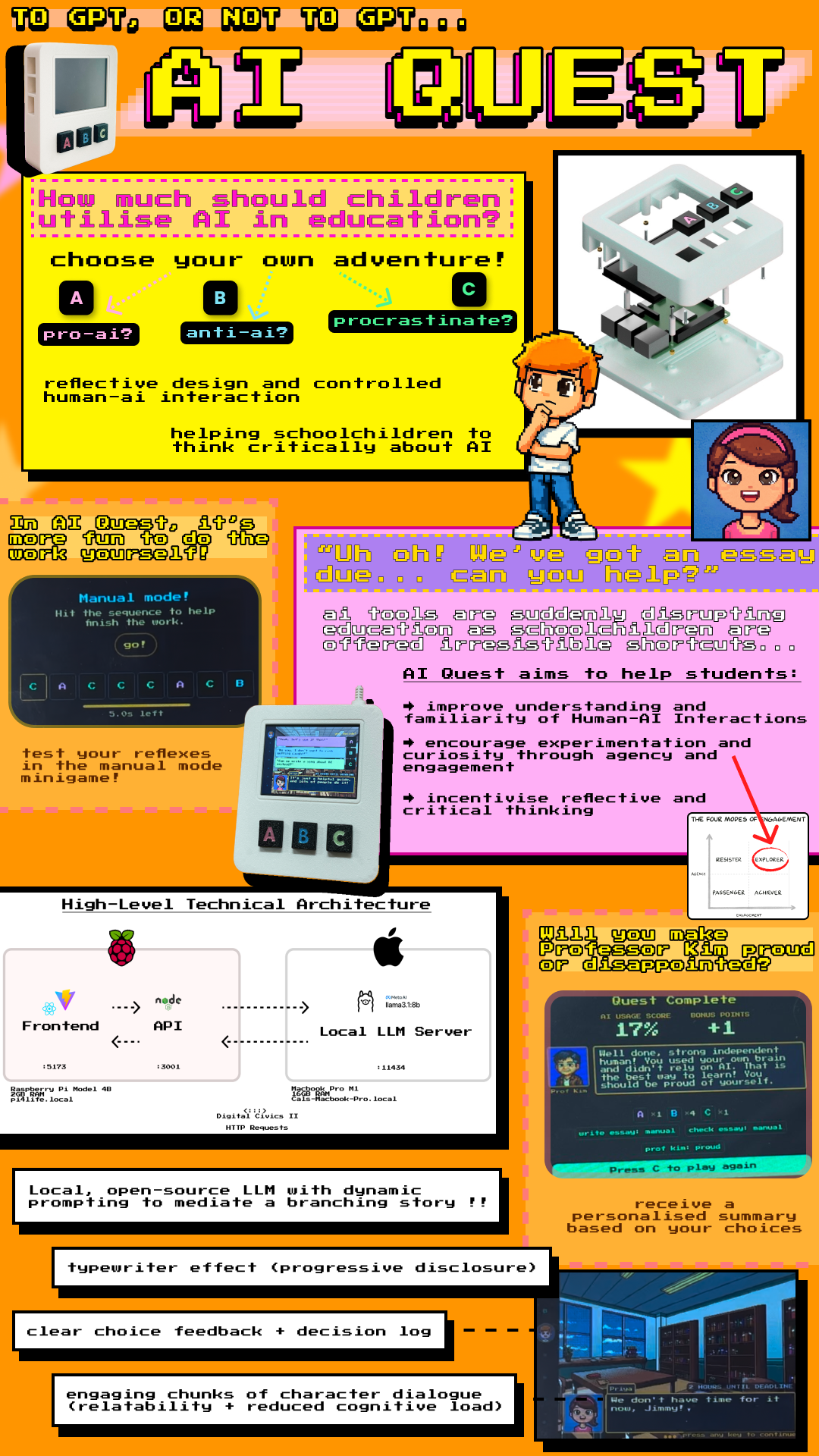
A tangible, mediated Human-AI Interaction console for schoolchildren — combining a self-hosted LLM, 3D-printed hardware, and reflective game design to foster holistic AI literacy.
Overview
AI tools are suddenly disrupting education. As schoolchildren are offered irresistible shortcuts — write my essay, check my work, solve this problem — emerging research warns of significant consequences regarding cognitive stunting. This outsourcing of active thinking to AI not only reduces learning outcomes but may fundamentally reshape how children develop as independent thinkers.
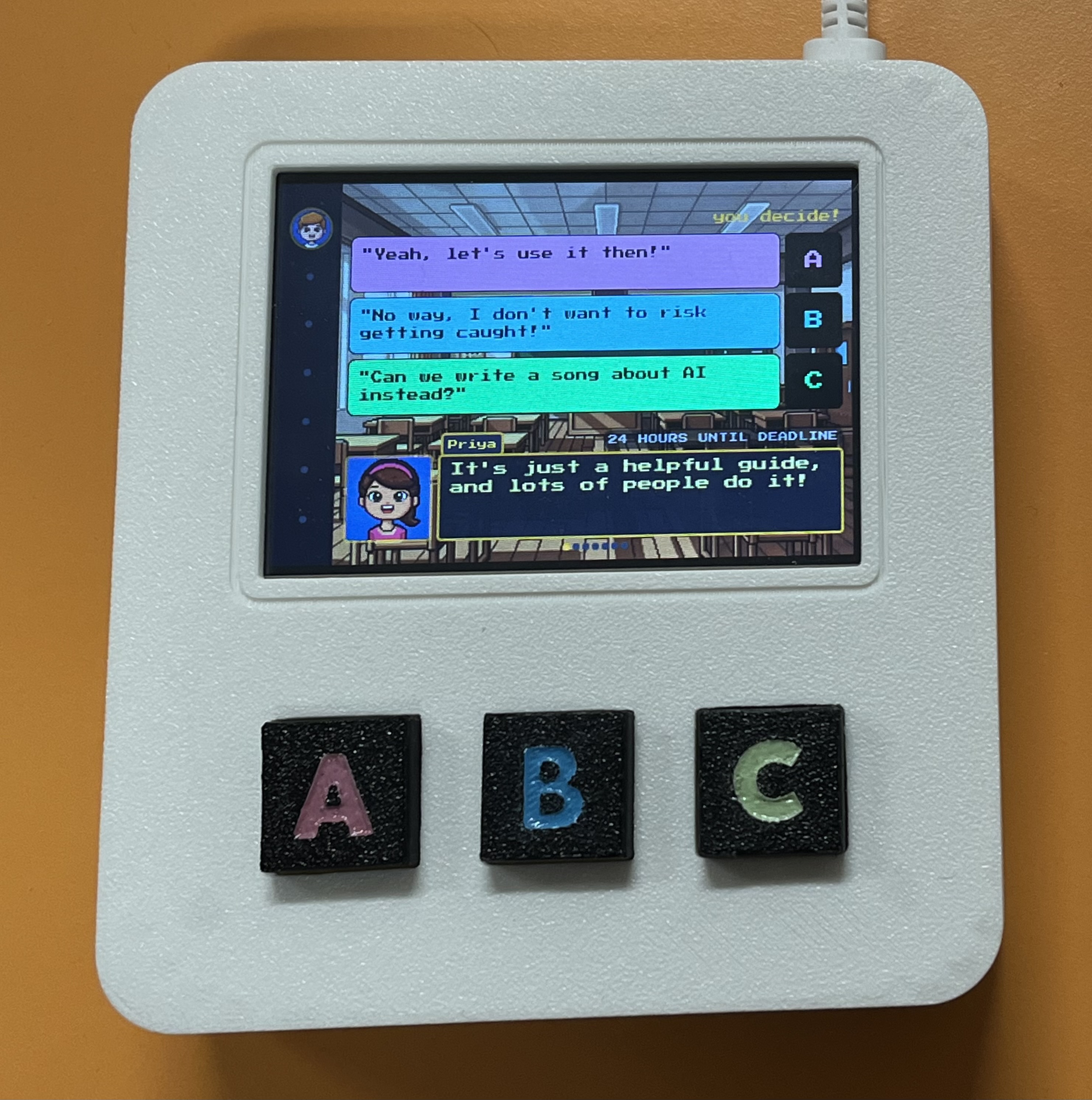
AI Quest is a tangible, handheld video game console designed for use in classrooms. It uses a locally-hosted large language model to mediate a branching choose-your-own-adventure story about a student navigating an essay deadline with AI tempting them at every turn. The goal is not to tell children that AI is bad — it's to give them a playful, physical, experiential space to develop what Rebecca Winthrop calls holistic AI literacy: curiosity, independence, critical reflection, and a healthy relationship with AI tools.
"In AI Quest, it's more fun to do the work yourself."
The project was built entirely from scratch by a multidisciplinary team of four — spanning hardware, software, UI/UX, and user research — over one semester within my MSc HCI study at Newcastle University. I led all software implementation and contributed to early ideation, proof-of-concept development, and cross-disciplinary integration.
Motivation and research framing
The project responds to a specific, urgent concern in education research. Burns, Winthrop et al. (2026) at the Brookings Center for Universal Education describe a growing pattern of cognitive offloading — students delegating thinking to AI rather than developing their own cognitive faculties. Anderson and Winthrop (2026) argue that AI cannot fix student engagement and that the solution lies in empowering curiosity and autonomy rather than optimising for output.
At the same time, children increasingly encounter AI as a black box — something that answers questions and produces results without any visibility into how or why. Explainable AI research suggests that physical, embodied interaction can make abstract AI systems more legible and understandable, particularly for younger users.
AI Quest sits at the intersection of these two concerns: it uses physical, mediated interaction and narrative design to make AI behaviour experiential — something to explore, question, and reflect on — rather than merely consume.
Ideation and concept development
The team's initial brief was "Giving Physical Form to AI." Early brainstorming drew on a wide range of references: Black Mirror: Bandersnatch for branching narrative consequence; Oregon Trail for decision-based educational gameplay; Zork for text-driven imagination; Pokémon for dialogue-driven storytelling and the typewriter aesthetic; Shadow the Hedgehog for multiple endings shaped by choices.
Three interaction approaches were explored in parallel:
- Gamified mechanics — increased engagement but risked shifting focus toward performance over reflection
- Conversational interfaces — felt too close to the AI tools children already use; didn't create sufficient critical distance
- Narrative-driven dialogue — enabled users to explore consequences of decisions over time; prioritised clarity and interpretability
The final design chose narrative over gamification as its primary mode, with gamified elements — the manual mode minigame, the AI usage score — used within the narrative frame rather than as the frame itself.
Form factor inspiration came from retro handheld consoles: Game Boy, PSP, Nintendo Switch Lite. The device needed to be holdable, tactile, and immediately legible as a game rather than an educational tool — reducing anxiety and inviting curiosity before any content appeared on screen.
Physical prototyping
Electronics and form factor
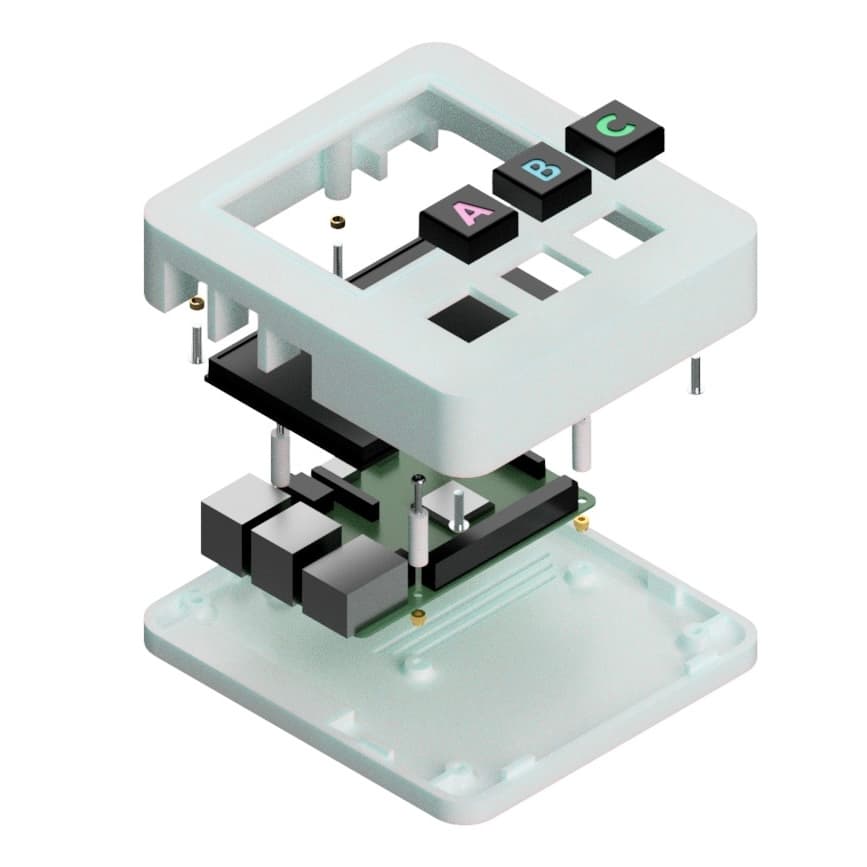
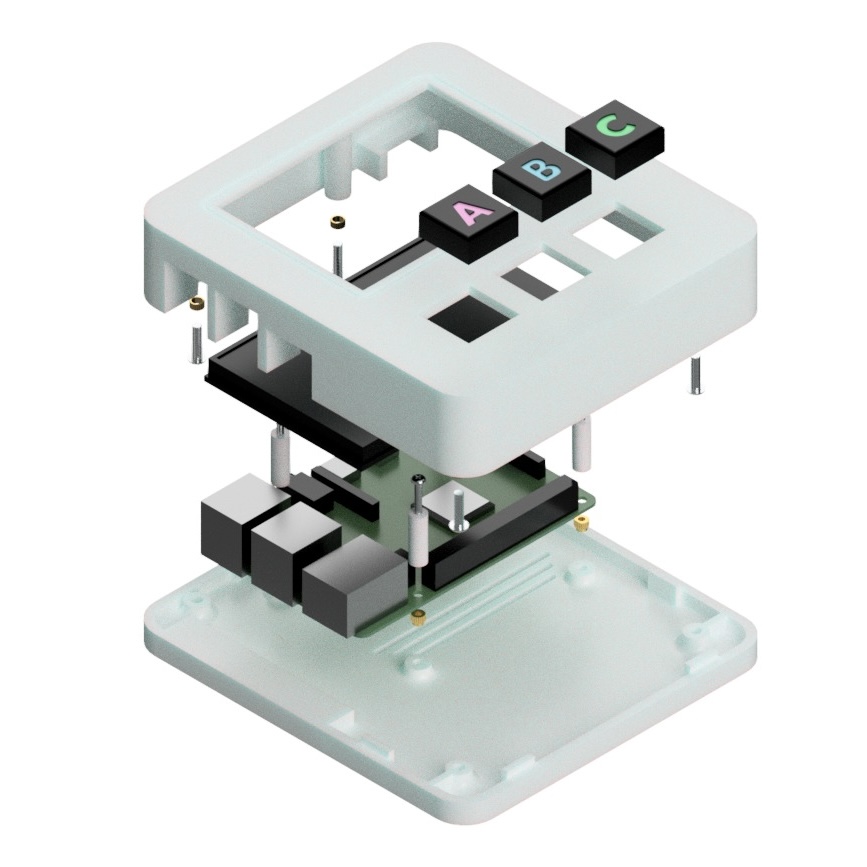
The core hardware comprised a Raspberry Pi 4B (2GB RAM), a WaveShare 3.5-inch GPIO-connected LCD (480 × 320 pixels), and three Gateron Red Liner mechanical keyboard switches.
Component layout was planned around the Pi's footprint before any CAD work began, establishing the overall enclosure dimensions.
3D modelling and printing
The enclosure was modelled in Fusion 360. A Pi model sourced online was cross-referenced against physical measurements with digital callipers before use. The enclosure was designed as slim as possible — Pi and display centred, with a void below for button placement — then split along its 3mm wall thickness into two halves comprising the outer shell.
Structural features included cylindrical pillars with connecting ribs to the nearest wall for mechanical joining, Pi standoffs (3mm rise for airflow and attachment), and a ventilation slot beneath the CPU to alleviate thermal concerns.
The enclosure was printed in white PLA on a Bambu printer in just under three hours.
Software architecture
LLM evaluation and the hybrid-local decision
My core focus was engineering LLMs to produce the desired narrative experience before integrating into the API. Early evaluation used GPT4All to test open-source models locally, assessing narrative coherence, consistency, latency, and RAM requirements. Several models were tested:
| Model | Parameters | Finding |
|---|---|---|
| Qwen 2 1.5B | 1.5B | Could run on Pi; narrative too repetitive and simplistic |
| Mistral Instruct 7B | 7B | Better coherence; RAM constraints on Pi still problematic |
| Llama 3 8B | 8B | Promising but context window limited |
| Llama 3.1 8B | 8B | Selected: larger context window, stronger benchmarks, acceptable latency |
Running the LLM on the Raspberry Pi itself was quickly ruled out — the 2GB RAM severely limited options to poorly performing models. Instead, I proposed a hybrid-local architecture: the Pi hosts the web application and API, while Llama 3.1 8B runs on my MacBook Pro M1 (16GB RAM) via Ollama on the same local Wi-Fi network.
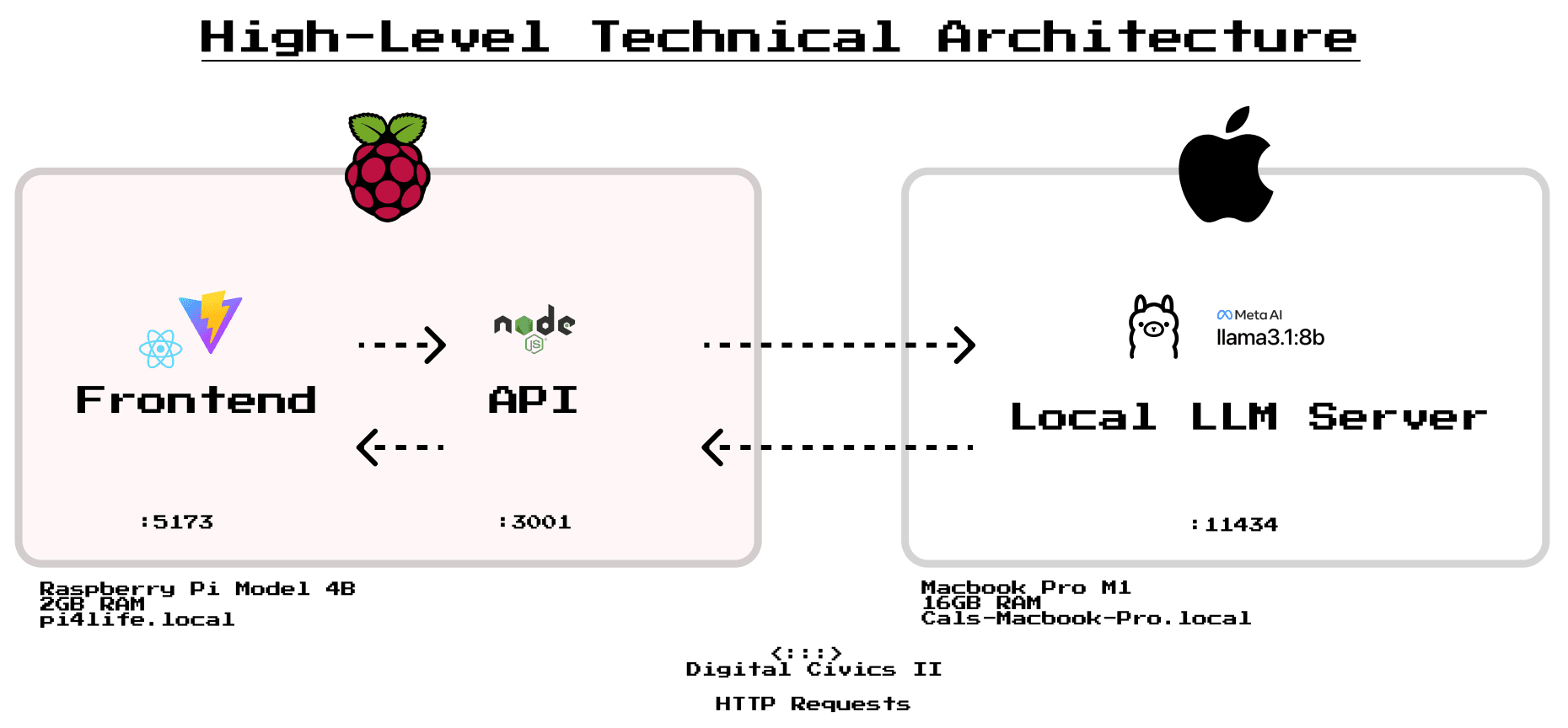
This architecture was not merely a technical workaround — it became a pedagogical asset. The visible laptop running the LLM on the demo desk made the AI infrastructure tangible: visitors could point at it, ask questions about it, understand that the responses came from a specific piece of hardware running a specific program. This directness was central to the project's educational goals.
The tradeoff was network dependency and reduced portability. In a classroom deployment, a dedicated local server would replace the MacBook — an acknowledged limitation with a clear remediation path.
Frontend
The frontend is a Vite + React single-page application designed specifically for the constraints of a 480 × 320 pixel embedded display. A single stateful controller component (src/App.jsx) orchestrates the entire experience via a history array of turns, deriving the current screen:
- Character select
- Story intro
- Phase transitions
- Dialogue and options (the core loop)
- Loading screen
- Manual mode minigame overlay
- Final summary
Key interaction design decisions informed by HCI theory:
Hick's Law: user input is reduced to three discrete options (A, B, C) throughout. No open-ended text input, no menus. This reduces cognitive load, creates a predictable interaction rhythm, and — crucially — constrains the LLM to manageable response structures.
Shneiderman's Eight Golden Rules: visual confirmation of selections through CSS animations; explicit "press any key to continue" prompts; one primary action per screen; consistent A/B/C button placement throughout.
Progressive disclosure (typewriter effect): dialogue is chunked into conversational passages between characters and revealed character-by-character, inspired by Pokémon's dialogue system. This paces the experience, reduces cognitive load, and makes the AI's "thinking" perceptible — users could watch responses arrive word by word, which consistently prompted questions during testing.
Loading screen design: LLM response latency (5–15 seconds) required a loading state. Rather than a blank spinner, the loading screen displays reflective quotes about AI and critical thinking — turning a technical constraint into a moment of contemplative pause appropriate to the project's educational aims.
Input constraints: a global keydown listener prevents input until the user is visually prompted, avoiding accidental interruption of story flow.
API
The Node.js API maintains a single in-memory game state per session and exposes two endpoints: /generate (initialise story) and /turn (process each choice). The API is responsible for:
- Dynamic prompting: constructing the full prompt sent to the LLM, including recursive story context to maintain narrative continuity
- Story state management: tracking player choices so the protagonist's temperament toward AI accumulates across turns
- Fixed story structure: six turns across three phases (write essay, check essay, discuss with Professor), each with a scene location and binary dilemma. This structure was a practical necessity — unconstrained LLM narrative generation proved too unpredictable and inconsistent for cohesive story progression
Prompt bloat was a significant challenge: recursively including all previous dialogue for context caused increasingly long prompts, leading to hallucinations and formatting errors. Extensive logging (API calls visible in terminal windows) made debugging possible but highlighted that developing and testing prompts in isolation before frontend integration would have been significantly more efficient.
Boot automation
In anticipation of frequent power cycles in a classroom context, several systemd service scripts automate the startup sequence:
- Auto-launch service: uses npm to start frontend and API server, then launches Chromium in kiosk mode for full-screen display
- GPIO buttons service: edge detection listeners map physical button presses (GPIO 21, 20, 16) to A/B/C keystrokes interpretable by the frontend
The Pi boots into a ready-to-play state within 45–60 seconds of powering on, with no manual intervention required. This seemingly minor detail had considerable practical value during the demo day — the console could be powered off and on repeatedly without any setup overhead.
The experience
The story scenario — 24 Hours Until Deadline — follows a student navigating an urgent essay. At each of three phase transitions, a dilemma presents itself:
- Write the essay: use AI, write it yourself, or procrastinate
- Check the essay: use AI to review it, check it yourself, or do something else
- The reckoning: face Professor Kim's assessment of your choices
Character dialogue is generated by the LLM within the fixed framework, with the protagonist's AI-dependency building or diminishing based on choices. The manual mode minigame — triggered when a player chooses the non-AI option — requires rapid sequential button presses (A/B/C in a displayed sequence) within a five-second countdown. The contrast is deliberate: AI responses arrive passively and effortlessly; manual work requires attention, coordination, and physical effort.
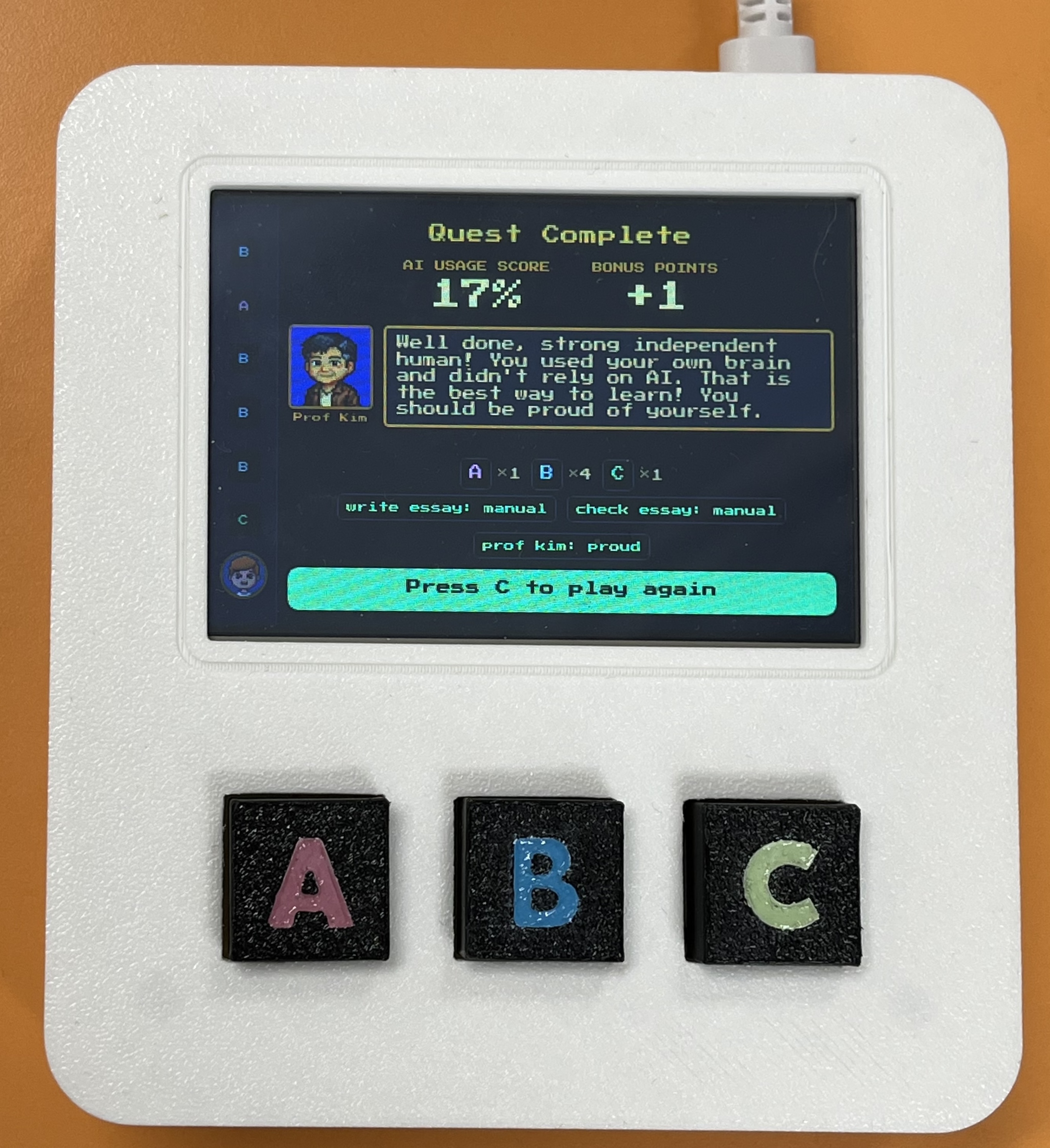
The summary screen presents an AI usage score, a tally of choices, plot points influenced, and bonus points for selecting the "funny" C procrastination options. Professor Kim delivers personalised reflective feedback based on the score. This data-driven, personalised ending incentivises replays and creates a clear cause-and-effect understanding of how choices shaped the story.
User testing
User testing yielded actionable insights that directly shaped iterative development. Feedback from five participants is summarised below:
| Dimension | Key findings |
|---|---|
| UI | Layout clear and consistent; retro aesthetic engaging; dialogue box occasionally flashed on load |
| Scenarios | Story easy to follow; "24 Hours Until Deadline" less relevant for younger children; wanted additional scenarios |
| Physical interaction | Buttons satisfying and tactile; ergonomics noted as a consideration for smaller hands |
| Understanding of AI | Prototype didn't sufficiently explain why AI makes certain decisions; understanding remained surface-level |
| Other | Loading time noted; welcome screen suggested; additional hardware sensors (accelerometer, speaker) proposed |
"It doesn't explain the AI decision-making process. It only shows the outcomes from AI. I don't think it can help users improve the understanding of AI systems."
"The buttons feel nice and the box feels nice in hand."
"Some explanation of the prompts running in the background would help the purpose of the prototype — i.e. critical thinking around the use of AI."
The most significant finding was the gap between the prototype's implicit critique of AI dependency (through narrative consequences) and users' desire for explicit transparency about how the LLM was making decisions. This reflects a broader tension in HAII design: making AI behaviour experiential is not the same as making it comprehensible. Future development would benefit from moments of explicit LLM transparency — surfacing the system prompt, explaining response generation — woven into the experience rather than remaining entirely backstage.
The manual mode minigame was directly derived from user testing, after participants expressed an expectation for greater interactivity when choosing manual options. It was the last feature implemented and proved to be a natural and satisfying development endpoint.
Collaborative prototyping: lessons learned
My individual report reflects honestly on the collaborative challenges of this project, which are worth documenting here as design process insights.
Early technical prototypes shape design in ways you don't anticipate. I developed a working proof-of-concept early to validate LLM feasibility — but the retro 8-bit aesthetic of that prototype inadvertently anchored the design team's subsequent work. Designers produced UI assets to match the existing code rather than exploring the full design space first. This disrupted the conventional design-before-implementation workflow and led to repeated work. Early prototypes should be explicitly framed as provisional technical experiments, not design proposals — and collaborative exploration of layout, immersion, and flow should precede them.
Clear role ownership improves efficiency but creates fragility. Technical responsibility concentrated on me, reducing shared understanding and creating a single point of failure for software changes. Pair programming and better documentation would have distributed knowledge and reduced bottlenecks, though significant experience gaps within the team make this genuinely difficult to implement.
Knowing when to stop building is a skill. The temptation to refine the prototype — more complex storylines, richer minigames — was persistent and came at the cost of documentation and testing time. The manual mode minigame provided a natural development endpoint, but reaching that point required discipline.
Demo day
The project was presented at an Open Lab demo day, where we set up a demonstration desk for lab visitors to play AI Quest and discuss it with us.
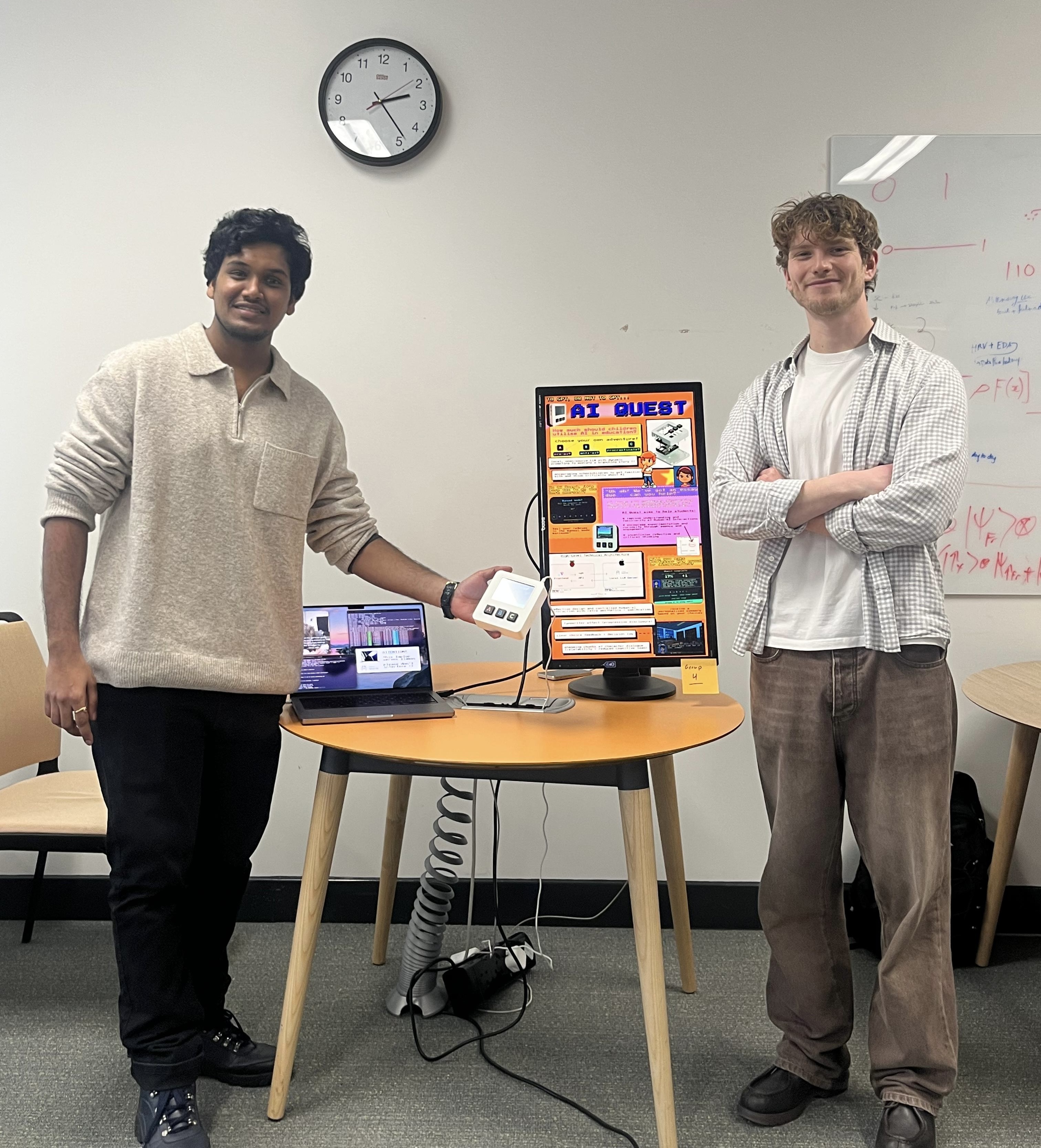
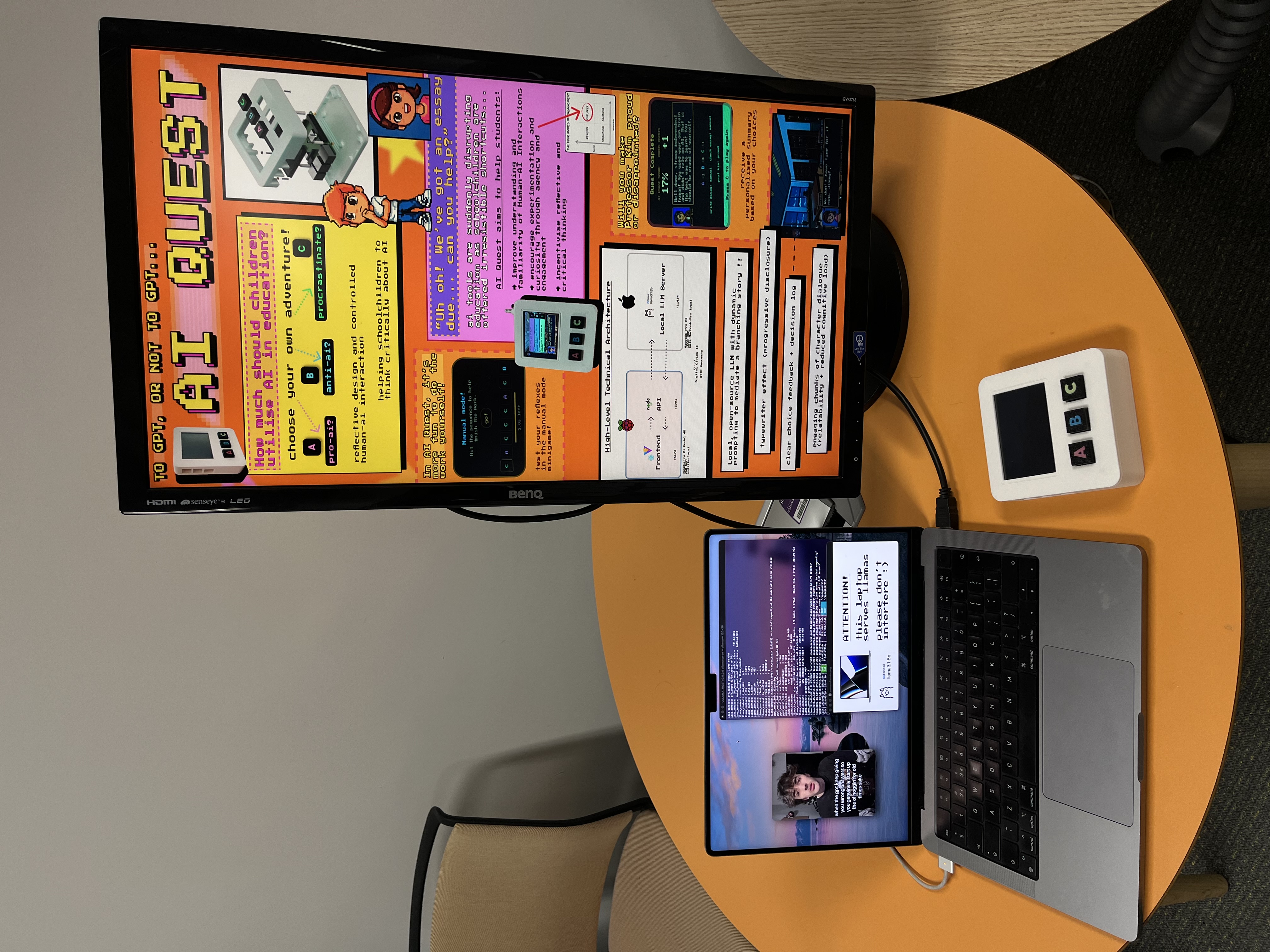
Demonstrating the full system — with the LLM server visibly running on the MacBook beside the console — consistently generated exactly the kind of discussion the project was designed to prompt. Visitors asked about the laptop's role, which opened conversations about compute, energy, and the infrastructure underlying modern AI tools.
Reflections
Designing for Human-AI Interaction is a sociotechnical challenge, not a technical one. The most consequential decisions in AI Quest were not about code — they were about what values to encode in the system prompt, how to make the AI's role visible without making it boring, and how to scaffold children's agency without removing it. HCI theories are negotiated through trade-offs between usability, technical constraints, and experiential goals rather than directly implemented.
Local-first as a values-driven architecture. Running the LLM on local hardware was not merely a privacy decision or a performance workaround — it was a statement about what responsible AI deployment looks like in an educational context. No data leaves the room. The infrastructure is visible and discussable. The choice of which model to run, and why, becomes part of the experience rather than an invisible detail.
Environmental considerations are embedded in LLM use. Training Llama 3.1 8B produced an estimated 420 tonnes CO2eq — though Meta's market-based emissions were 0 tonnes CO2eq due to renewable energy commitments. These impacts are worth surfacing: the physical presence of hardware running an LLM creates a natural opportunity to discuss the real resource costs of AI generation that cloud-based tools entirely abstract away.
Prompt engineering is harder than it looks. Despite choosing Llama 3.1 8B for its benchmarking performance, maintaining coherent narrative output within a structured framework required extensive iteration, fallback handling, and eventually a fixed story structure that constrained the LLM's output significantly. For future development, pre-generating narrative branches or fine-tuning a story-specific model would produce substantially better results with less engineering overhead.
Links
- GitHub repository
- Group paper: AI Quest: A Tangible Interactive Game Exploring AI Dependence in Learning (Newcastle University, 2026)